
Vetric Instagram User Search
Search for Instagram users using a keyword
The Vetric Instagram User Search allows you to search users using a keyword.
The complete Vetric documentation about their endpoint can be found in their site here.
New to Datastreamer? Start here.
Unify SchemaThis data source already use Unify Schema.
API Key
To use this component, you will need a Vetric API key. If you don't have one, please reach out to [email protected] and our team will assist you in obtaining the necessary credentials.
How To Use?
The component is powered by the Jobs System, when interacting with the component you have the option to define your jobs queries.
Search Query
Filters
| Filter Name | Description |
|---|---|
| query | String to query for users |
| query_from | Filter dates from/since - Example '2024-05-01T00:00:00Z' |
| query_to | Filter dates to - Example '2024-08-01T00:00:00Z' |
| max_documents | Set a limit for the number of documents that will be fetched for the search. |
| max_excess_documents | When filtering by date, this sets the limit of documents to process that fall outside the date range. This serves as a cost-control measure. Note that costs apply for all retrieved documents, including those that are discarded. |
Since the Vetric endpoint does not natively support date filtering, the query_from and query_to filters are applied in memory. Because we cannot guarantee how many documents must be retrieved to find those within the desired date range, the max_excess_documents field can be used to limit the number of documents processed.
Examples
Search users using a keyword
Search for users using the keyword 'samharrisorg'.
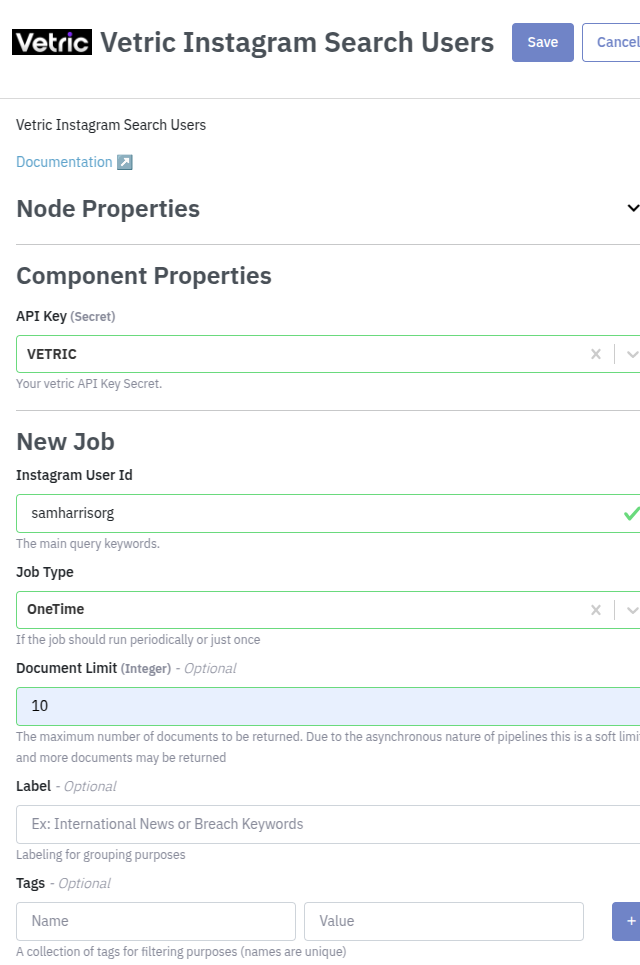
You also have the option to use the API. You can use the Code button to extract this example:
curl --location 'https://api.platform.datastreamer.io/api/pipelines/{PIPELINE_ID}/components/{COMPONENT_ID}/jobs?ready=true' \
      --header 'apikey: <your-api-key>' \
      --header 'Content-Type: application/json' \
      --data \
        '{
          "job_name": "{JOB_NAME}",
          "data_source": "vetric_instagram_user_search",
          "query": {
            "query": "samharrisorg"
          },
          "job_type": "oneTime",
          "max_documents": 10
        }'
For more details on creating data collection jobs, see Job Management.
Additional Details
Compatible Metadata Fields
| Applicable Metadata Categories | Compatible |
|---|---|
| Source | Yes |
| Content | Yes |
| Author | Yes |
| Person | No |
| Enrichment | Yes |
| Organization | No |
| Data source-specific fields? | Yes, please see the Metadata page. |
Metadata Example
{
    "data_source": "vetric_instagram_user_search",
    "id": "1399661404",
    "author": {
        "handle": "botbotbotbotbotbotbot",
        "profile_image_source": "https://scontent-lga3-2.cdninstagram.com/v/t51.2885-19/10488725_313528648805724_1356578836_a.jpg?_nc_ht=scontent-lga3-2.cdninstagram.com&_nc_cat=100&_nc_ohc=swBvTdbg1YgQ7kNvgECkxoW&edm=AM7KJZYBAAAA&ccb=7-5&oh=00_AYAQdeIu2wLtVcw53OvxgQRNxQQWnHTaMnplBxBqyjpbiw&oe=669F08B4&_nc_sid=8ec269",
        "verified": false,
        "url": "https://instagram.com/botbotbotbotbotbotbot/"
    }
}
Data collection job creation request
Returns Instagram users matching a keyword. The query value is expected to be keyword to search Instagram users.
curl --location 'https://api.platform.datastreamer.io/api/pipelines/{PIPELINE_ID}/components/{COMPONENT_ID}/jobs?ready=true' \
      --header 'apikey: <your-api-key>' \
      --header 'Content-Type: application/json' \
      --data \
        '{
			    "job_name": "my instagram data collection",
			    "data_source": "vetric_instagram_user_search",
			    "query": {
			            "query": "instagram"
			        },
			    "job_type": "oneTime"
				}'
Make sure to replace ‘PIPELINE_ID’ and ‘COMPONENT_ID’ variables to the ones associated with your pipeline.
Updated 3 months ago