
Language Detection (Google Service)
Detecting language used in any field of given inputs
About
The Language Detection (Google Service) component uses Google Translate Service to detect the language used in any field from the given input. The detected language is presented in a two-letter ISO 3166-1 alpha-2 code format (lowercase). This component supports both real-time and batch-processing workflows.
Adding to your Dynamic Pipeline
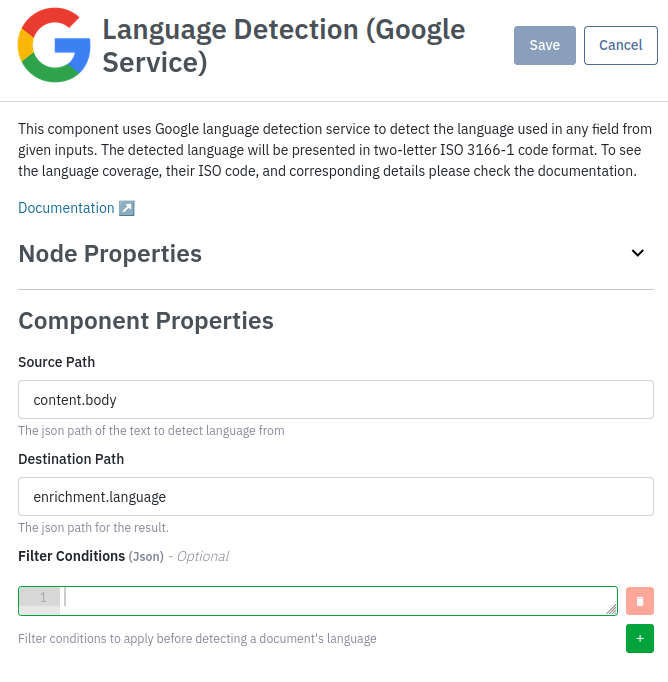
This component can be added to your Dynamic pipelines through the "Language Detection (Google Service)" component. It requires the following fields for configuration:
- Destination Path (Required): The JSON path where the detected language code will be output. By default, this is set to
enrichment.language. The field can be an existing field, or the component can create a new field. - Source Path (Required): The JSON path of the input field that Language Detection will use as a source. By default, this is set to
content.body, but any field can be chosen. - Filter Conditions (Optional): Filter conditions to apply before detecting a document's language. See JSON Conditions page for more information.
Dynamic Pipeline Example Configuration
The following example shows a dynamic pipeline configuration for the Language Detection component:
enrichment.languageis set as the destination path for the detected language codecontent.bodyfrom the input document is set as the Source Path for language detection
The language coverage is continuously improved as this component uses Google Translate API in the back end. Referring to https://cloud.google.com/translate/docs/languages, the language coverage includes:
| Language | Language ID (ISO 3166-1 alpha-2) |
|---|---|
| Afrikaans | af |
| Albanian | sq |
| Amharic | am |
| Arabic | ar |
| Armenian | hy |
| Assamese | as |
| Aymara | ay |
| Azerbaijani | az |
| Bambara | bm |
| Basque | eu |
| Belarusian | be |
| Bengali | bn |
| Bhojpuri | bho |
| Bosnian | bs |
| Bulgarian | bg |
| Catalan | ca |
| Cebuano | ceb |
| Chinese (Simplified) | zh-CN |
| Chinese (Traditional) | zh-TW |
| Corsican | co |
| Croatian | hr |
| Czech | cs |
| Danish | da |
| Dhivehi | dv |
| Dogri | doi |
| Dutch | nl |
| English | en |
| Esperanto | eo |
| Estonian | et |
| Ewe | ee |
| Filipino (Tagalog) | fil |
| Finnish | fi |
| French | fr |
| Frisian | fy |
| Galician | gl |
| Georgian | ka |
| German | de |
| Greek | el |
| Guarani | gn |
| Gujarati | gu |
| Haitian Creole | ht |
| Hausa | ha |
| Hawaiian | haw |
| Hebrew | he |
| Hindi | hi |
| Hmong | hmn |
| Hungarian | hu |
| Icelandic | is |
| Igbo | ig |
| Ilocano | ilo |
| Indonesian | id |
| Irish | ga |
| Italian | it |
| Japanese | ja |
| Javanese | jw |
| Kannada | kn |
| Kazakh | kk |
| Khmer | km |
| Kinyarwanda | rw |
| Konkani | gom |
| Korean | ko |
| Krio | kri |
| Kurdish | ku |
| Kurdish (Sorani) | ckb |
| Kyrgyz | ky |
| Lao | lo |
| Latin | la |
| Latvian | lv |
| Lingala | ln |
| Lithuanian | lt |
| Luganda | lg |
| Luxembourgish | lb |
| Macedonian | mk |
| Maithili | mai |
| Malagasy | mg |
| Malay | ms |
| Malayalam | ml |
| Maltese | mt |
| Maori | mi |
| Marathi | mr |
| Meiteilon (Manipuri) | mni-Mtei |
| Mizo | lus |
| Mongolian | mn |
| Myanmar (Burmese) | my |
| Nepali | ne |
| Norwegian | no |
| Nyanja (Chichewa) | ny |
| Odia (Oriya) | or |
| Oromo | om |
| Pashto | ps |
| Persian | fa |
| Polish | pl |
| Portuguese | pt |
| Punjabi | pa |
| Quechua | qu |
| Romanian | ro |
| Russian | ru |
| Samoan | sm |
| Sanskrit | sa |
| Scots Gaelic | gd |
| Sepedi | nso |
| Serbian | sr |
| Sesotho | st |
| Shona | sn |
| Sindhi | sd |
| Sinhala (Sinhalese) | si |
| Slovak | sk |
| Slovenian | sl |
| Somali | so |
| Spanish | es |
| Sundanese | su |
| Swahili | sw |
| Swedish | sv |
| Tagalog (Filipino) | tl |
| Tajik | tg |
| Tamil | ta |
| Tatar | tt |
| Telugu | te |
| Thai | th |
| Tigrinya | ti |
| Tsonga | ts |
| Turkish | tr |
| Turkmen | tk |
| Twi (Akan) | ak |
| Ukrainian | uk |
| Urdu | ur |
| Uyghur | ug |
| Uzbek | uz |
| Vietnamese | vi |
| Welsh | cy |
| Xhosa | xh |
| Yiddish | yi |
| Yoruba | yo |
| Zulu | zu |
Usage in Search API
This operation allows a user to specify the destination field and source field.
Example Output
{
    "query": {
        ...
    },
    "operations": [
        {
            "name": "detect_language",
            "destination_path": "enrichment.language",
            "parameters": {
                "source_path": "content.body"
            }
        }
    ]
}
Updated 4 months ago