
Detailed Billing Views (Using Tags)
Categorize and filter pipeline usage costs with custom billing tags
Detailed Billing views use Tags
Tags are set when you create Jobs in your Pipelines. If you are not familiar with Tags or Job creation, it is recommended to review Tags first. For more information on Job creation and Tags click here
Overview
Billing tags are a powerful feature that allows you to categorize and filter pipeline usage data for detailed cost analysis. By adding billing tags to your pipeline jobs, you can track costs at a more granular level, such as by department, project, client, or environment.
This feature enables precise cost management and helps you understand exactly the costs and usage at a detailed level.
How to View Detailed Usage with Billing Tags
Within Portal, you can access this detailed usage within Billing Dashboard. Inside this dashboard, you can:
- Select a time period and component
- Choose one or more billing tags to filter your usage data
- View cost breakdowns specific to those tags
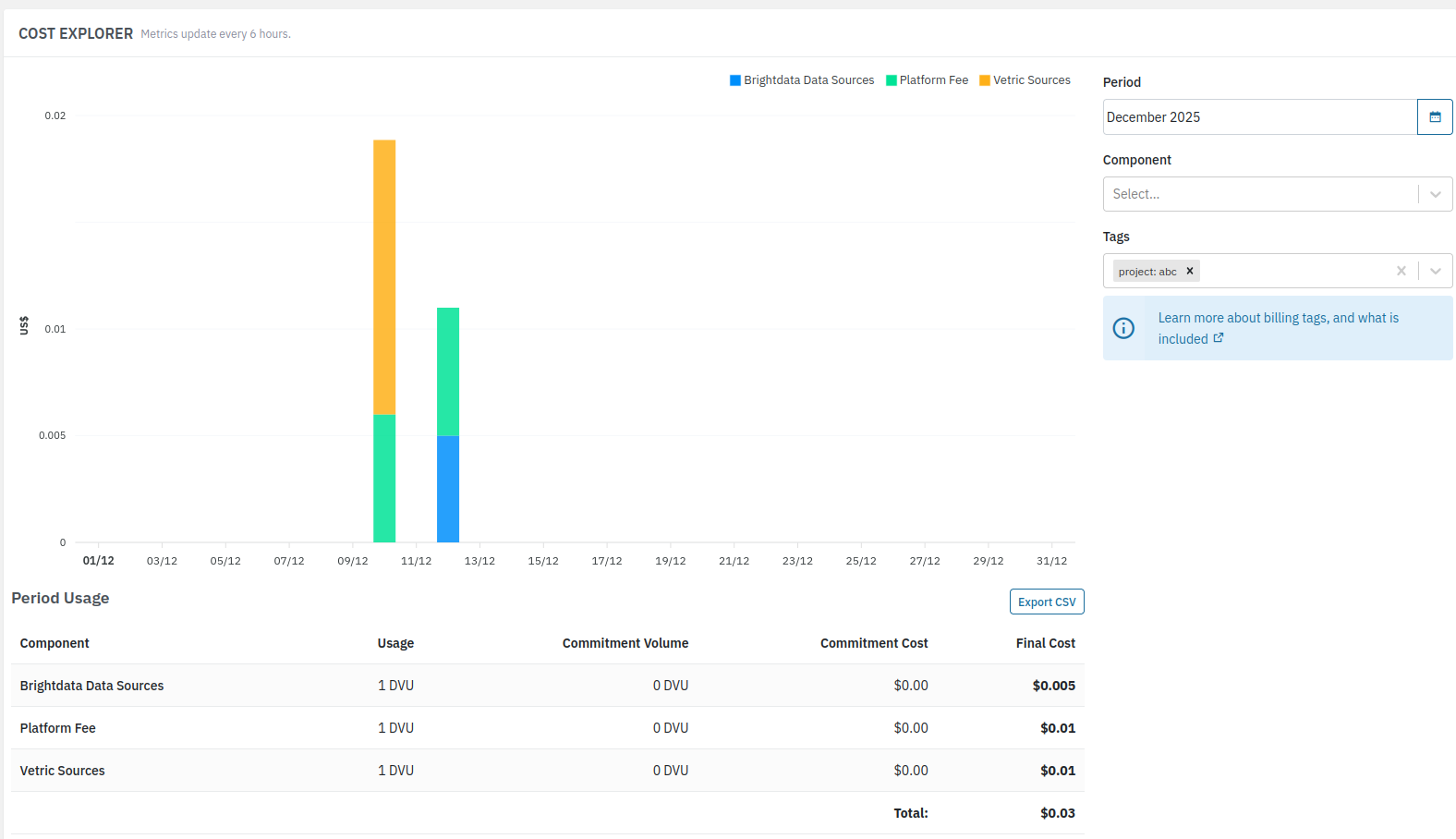
All usage and billing associated with content ingested using those Billing Tags is shown, and can also be exported to CSV.
Billing Data Refresh Periods
Billing Dashboard information is processed and updated on a recurring period every six hours, and therefore will not immediately display usage if a Billing Tag has just been used.
Common Use Cases
Here are some common use cases for Billing Tags. You can have multiple Billing Tags associated with any job, allowing you to apply your own measurement taxonomy to match your requirements. The below are simply examples.
| Use Case | Example Tag Name | Example Tag Value |
|---|---|---|
| Departmental cost tracking | department | marketing, engineering, sales |
| Project-based billing | project | website-2024, data-migration |
| Client billing | client | acme-corp, globex-inc |
| Environment separation | environment | production, staging, development |
| Product line analysis | product | data-pipeline, analytics-platform |
How To Being Using Billing Tags For Detailed Usage
When you run pipeline jobs, you can assign tags to them. Each tag consists of:
- Name: The category you want to track (e.g., "department", "project", "client")
- Value: The specific value for that category (e.g., "marketing", "website-redesign", "acme-corp")
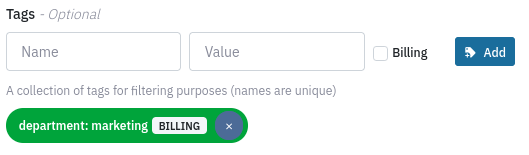
- Billing flag: A selection that marks the tag as a billing tag.
Only tags marked with the billing checkbox are processed for billing purposes and appear in the Billing Dashboard with filtering capabilities.
Tags without Billing Flag will not be used as Billing Tags
If you have Jobs with Tags, but do not have the "Billing Flag", those tags will operate as normal tags and not have the additional application within Billing.
Adding Billing Tags to Jobs using the Portal
- Navigate to your pipeline
- Choose one Ingress component to add a new Job
- In the Job configuration, for each tag:
- Enter a Name (e.g., "department")
- Enter a Value (e.g., "marketing")
- Check the Billing checkbox if you want this tag to affect billing categorization
- Add the new Job and wait it to run.
Adding Billing Tag to Jobs using the API
You can also use the API create Jobs and set a tag as a Billing Tag, using the is_billing_tag flag:
curl --location 'https://api.platform.datastreamer.io/api/pipelines/a2f4e2eb/components/8gffjwo3/jobs?ready=true' \
      --header 'apikey: <api_key>' \
      --header 'Content-Type: application/json' \
      --data \
        '{
          "job_name": "f738dad8-c804-4910-a850-af2f436a7ccd",
          "component_name": "reddit-auto",
          "data_source": "reddit_auto",
          "query": {
            "provider_data_source": "brightdata_reddit_posts",
            "search_type": "keywords",
            "keywords": [
              "canada"
            ],
            "date": "Today"
          },
          "job_type": "oneTime",
          "max_documents": 5,
          "tags": [
            {
              "name": "department",
              "value": "marketing",
              "is_billing_tag": true
            }
          ]
        }'
Frequently Asked Questions
Are all Tags visible in billing?
No, only tags marked with the Billing checkbox (or in the API using is_billing_tag: true) affect billing calculations
How are global features without Tags shown?
Global features (like Searchable Storage) are excluded when filtering by Billing Tags
Do all ingress components have tags?
Not all Ingress components support tags, and therefore some ingress components may not be able to have detailed usage metrics seperated by Billing Tags.
Can multiple tags within a Job have the same name?
Tag names must be unique within a single job configuration
Do I need to provide both a tag name and tag value?
Yes, both tag name and value are required fields for the proper functioning of tags. The Billing Flag is optional for tag usage, but required for the tag to have Billing properties.
Is there a limit to the number of tags?
There is no hard limit to the number of tags, however excess use of tags may cause edge cases or export to CSV failures. If you are unsure if the number of tags may exceed 10,000, please let us know, and we can verify if any issues may be experienced.
Updated 4 months ago