
Datashake X (Twitter)
Search and scrape X (Twitter) posts, tweets, and profiles using keyword searches or content URLs
The Datashake X (Twitter) component allows you to search and scrape X (Twitter) content using keyword searches, content scraping, and content source scraping. It handles the interaction, polling, and result download; and ingresses the returned data into your pipeline.
The complete Datashake documentation about their endpoint can be found in their site here.
New to Datastreamer? Start here.
Unify SchemaThis data source already use Unify Schema.
API Key
To use this component, you will need a Datashake API key. If you don't have one, please reach out to [email protected] and our team will assist you in obtaining the necessary credentials.
How To Use?
The component is powered by the Jobs System, when interacting with the component you have the option to define your jobs queries.
Search Type
| Search Type | Description |
|---|---|
| Keyword Search | Search for posts containing specific keywords using boolean operators (AND, OR, NOT) |
| Content (Single Post) | Scrape a specific tweet with its comments |
| Content Source (Profile/Account) | Scrape multiple posts from a profile or account |
Filters
| Filter Name | Description |
|---|---|
| search_type | The type of search to perform |
| query | Get posts based on a search query. Supports boolean operators: AND, OR, NOT, parenthesis and double quotes |
| url | URL of a post or content source (profile, account) |
| mode | Archive mode searches only the internal archive (faster). On Demand mode performs a real-time search (may take longer). Note: Keyword search is always in archive mode |
| max_content | Maximum number of posts/videos to scrape from a profile/account/channel. Default: 100 |
| max_comments_per_content | Maximum number of comments to retrieve for each scraped post. Default: 200 |
| query_from | Filter dates from/since - Example '2024-05-01T00:00:00Z' |
| query_to | Filter dates to - Example '2024-08-01T00:00:00Z' |
Examples
Keyword Search
Search for X (Twitter) posts with the keyword "gpt4" between 12/01/2025 and 12/19/2025.
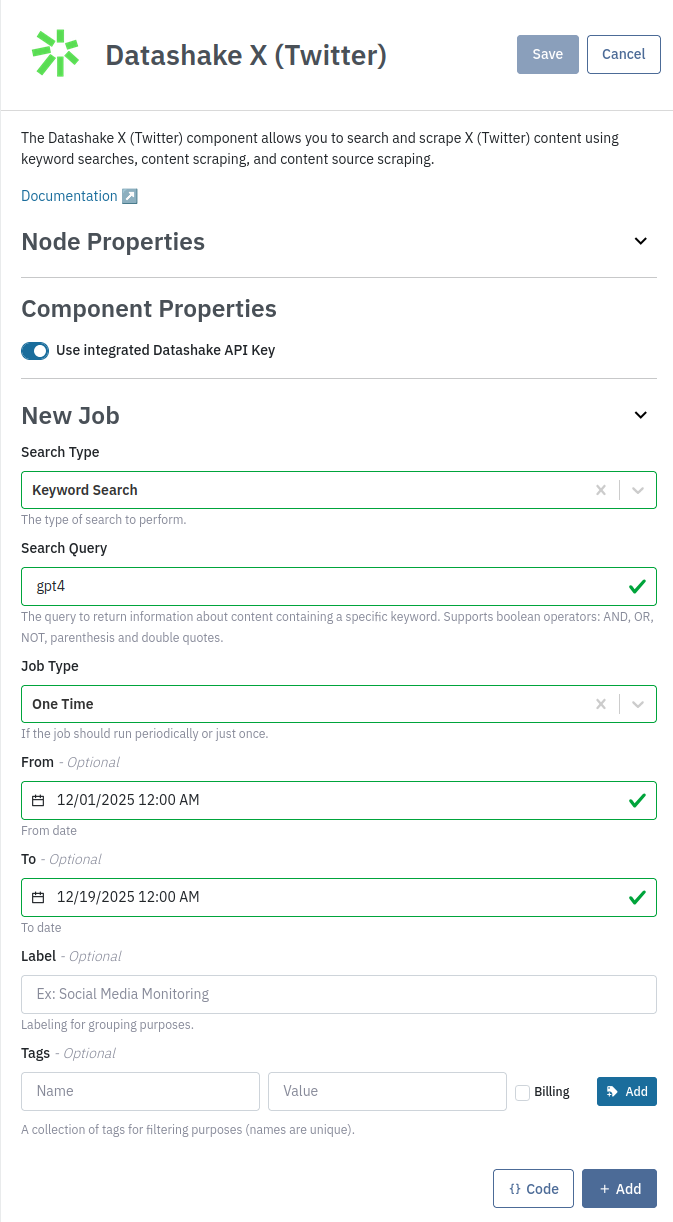
You also have the option to use the API. You can use the Code button to extract this example:
curl --location 'https://api.platform.datastreamer.io/api/pipelines/{PIPELINE_ID}/components/{COMPONENT_ID}/jobs?ready=true' \
      --header 'apikey: <your-api-key>' \
      --header 'Content-Type: application/json' \
      --data \
        '{
          "job_name": "e50fa843-04da-4753-a80c-58d60927c4e3",
          "component_name": "datashake-x-ingress",
          "data_source": "datashake_socialmedia_x",
          "query": {
            "search_type": "keyword",
            "query": "gpt4"
          },
          "job_type": "oneTime",
          "query_from": "2025-12-01T00:00:00.000Z",
          "query_to": "2025-12-19T00:00:00.000Z"
        }'
Content (Single Post)
Scrape a specific tweet with its comments.
curl --location 'https://api.platform.datastreamer.io/api/pipelines/{PIPELINE_ID}/components/{COMPONENT_ID}/jobs?ready=true' \
      --header 'apikey: <your-api-key>' \
      --header 'Content-Type: application/json' \
      --data \
        '{
          "job_name": "e50fa843-04da-4753-a80c-58d60927c4e3",
          "component_name": "datashake-x-ingress",
          "data_source": "datashake_socialmedia_x",
          "query": {
            "search_type": "content",
            "url": "https://x.com/example/status/123456789",
            "mode": "on_demand",
            "max_comments_per_content": 200
          },
          "job_type": "oneTime"
        }'
Content Source (Profile/Account)
Scrape multiple posts from an X (Twitter) profile.
curl --location 'https://api.platform.datastreamer.io/api/pipelines/{PIPELINE_ID}/components/{COMPONENT_ID}/jobs?ready=true' \
      --header 'apikey: <your-api-key>' \
      --header 'Content-Type: application/json' \
      --data \
        '{
          "job_name": "e50fa843-04da-4753-a80c-58d60927c4e3",
          "component_name": "datashake-x-ingress",
          "data_source": "datashake_socialmedia_x",
          "query": {
            "search_type": "content_source",
            "url": "https://x.com/example",
            "mode": "on_demand",
            "max_content": 100,
            "max_comments_per_content": 50
          },
          "job_type": "oneTime"
        }'
Updated 4 months ago