
GenAI Intent Classifier
Classify social media content by intent with AI. Detect Purchase, Complaint, Feedback, Request & more.
The GenAI Intent Classifier enables customers to automatically classify social media content by detecting intent within posts. It categorizes content into 8 predefined intent categories: Inquiry, Complaint, Feedback, Request, Purchase, Support, Cancellation, or Reservation. This classification helps organisations assess customer sentiment, identify business opportunities, and improve response strategies in real time. Powered by Gemini 2.5 Flash Lite, the GenAI Intent Classifier achieves high accuracy, efficiently identifying intent patterns and categorizing them into structured outputs for better decision-making and customer engagement.
Adding to your Dynamic Pipeline
This component can be seamlessly integrated into your Dynamic pipelines through the "GenAI Intent Classifier" component. It requires the following fields for configuration:
Destination Path (Required)
The "enrichment.intent" field is designated to store the intent classification output. This output includes an intent label — one of eight possible categories:
- Inquiry — Questions or requests for information
- Complaint — Expressions of dissatisfaction or problems
- Feedback — Opinions, suggestions, or reviews
- Request — Direct appeals for action or assistance
- Purchase — Intent to buy or acquire products/services
- Support — Requests for technical or customer support
- Cancellation — Intent to cancel services or orders
- Reservation — Intent to book or reserve services Each label includes a confidence score ranging from 0 to 1, reflecting the model's certainty for each intent category detected.
Target Text (Required)
This is the metadata field containing the input text for intent analysis. By default, it's set to content.body, but any field containing relevant text can be used. If the Gemini Model encounters safety issues with certain content, the API will fail to generate output.
Dynamic Pipeline Configuration Example
The following example shows a dynamic pipeline configuration for the GenAI Intent Classifier component. If Unify is the preceding step in your pipeline, you can set it up as follows:
- content.body from the input document is specified as the Target Text for the GenAI Intent Classifier
- enrichment.intent is designated as the Destination Path for storing the GenAI Intent
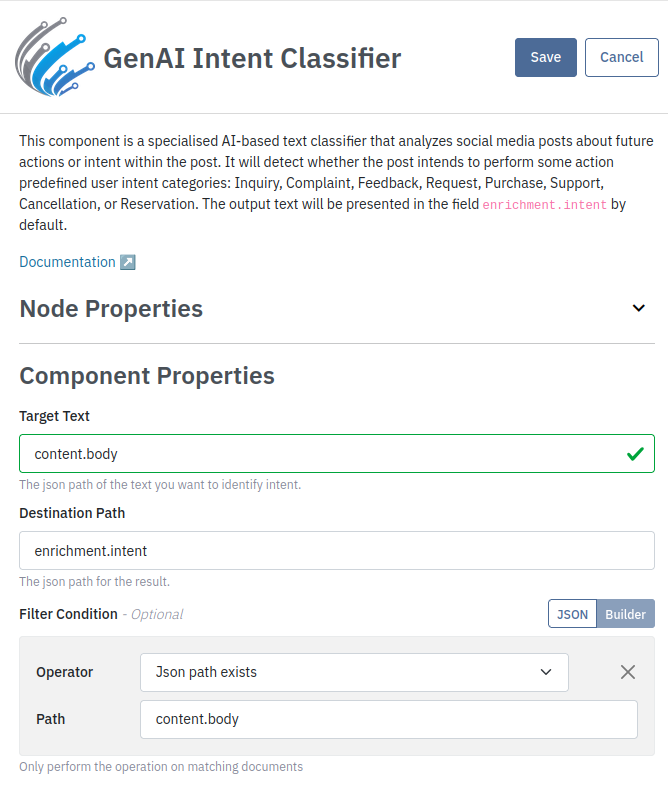
Classifier output
{
    "enrichment": {
        "intent": {
            "label": "Purchase",
            "confidence": 0.87
        }
    }
}
Updated 2 months ago