
Creating Jobs
Learn how to create Jobs for data collection.
Pipeline RequiredIf you do not yet have a Pipeline created, you should create a pipeline first. The Pipeline ID and Step ID will be required for adding Jobs to the correct Pipeline and step.
If you wish to manage Jobs via API, you will need to setup the Pipeline initially in the Portal UI. After setting up the Pipeline, you can create new Jobs through APIs.
Our platform provides two convenient ways for you to create jobs: through our intuitive web Portal and via our API. Whether you prefer a graphical interface or a programmatic approach, we've got you covered.
With our platform, you can easily manage the job creation process from start to finish. Below, we'll walk you through both options in detail.
Creating a Job within Portal
Within Portal, navigate to your Pipeline. If the Pipeline is not running, you will need to deploy first. This can be done from the pipeline list view from the pipeline ellipsis or in 'View' mode of the pipeline.
Then, you can select the 'Manage Jobs' for the Ingress Component that you wish to create Jobs for, and it will open a configuration Sidebar. Below setup you will have the ability to create a new job. This will also provide visibility of the options available for the data source that can vary depending by data source.
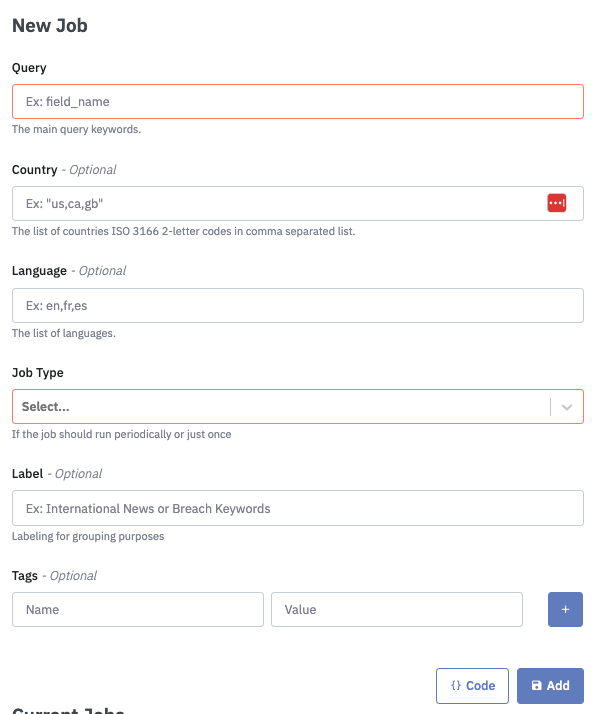
Example for Socialgist Blogs Ingress Component.
Jobs created will be visible below in "Current Jobs". For a more detailed view use the link "Pipeline Jobs Page"
Updated 4 months ago