
Twitter/X Post Metrics Collector
Fetches metrics for Twitter/X posts and enriches incoming JSON documents with the collected data
Common uses:
- Enriching social media content with metrics information
- Improves the accuracy of AI operations in the document
Important
This component must be used on documents produced by the Unify Transformer component. In other words, it can be added in the pipeline only after Unify Transformer component.
Component Configuration
You can add and configure Twitter/X Post Metrics Collector in your pipeline by adding the component as an operation.
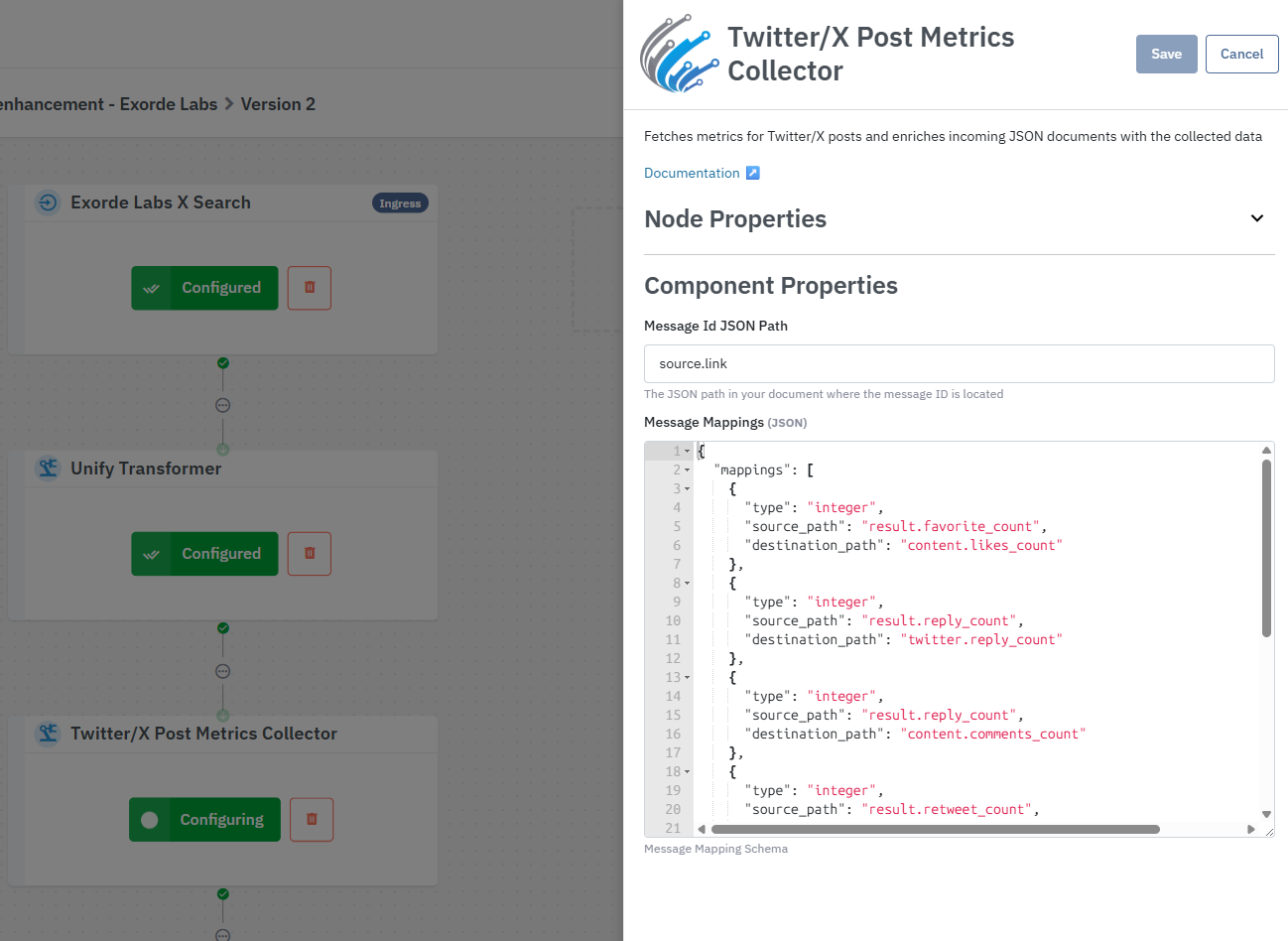
Message Id JSON Path
Specifies the JSON path in your source document where the message identifier (such as a Twitter/X post URL) is located. The component will use this ID to retrieve corresponding post metrics detail from another source.
For example, if the incoming document contains:
{
  "data": {
    "documents": [
      {
				...
        "source": {
          "link": "URL-to-a-twitter/x-post"
        }
				...
      },
      {
				...
        "source": {
          "link": "URL-to-another-twitter/x-post"
        }
				...
      }
    ]
  }
}
And you set the Message Id JSON Path to source.link, the component will use the information found there to go and collect additional data.
The incoming document fields definition is the Datastreamer Default Schema.
Message Mappings
This setting defines how message data is added/merged into your documents.
This setting defines how data is copied from a source JSON document into a destination JSON document.
- The source JSON document schema depend on the service used by the collector to get the additional data.
- The destination JSON document schema is the Datastreamer Default Schema.
Each mapping rule contains three fields:
type: The data type of the value (string, integer, boolean, date)source_path: The field name in the message response datadestination_path: Where to place the data in your document
Example Mapping
Given the mapping:
{
  "mappings": [
    {
      "type": "integer",
      "source_path": "result.retweet_count",
      "destination_path": "twitter.retweet_count"
    },
    {
      "type": "integer",
      "source_path": "result.favorite_count",
      "destination_path": "content.likes_count"
    }
  ]
}
If the component returns message data like:
{
  "result": {
			"favorite_count": 68297,
    	...
    	"retweet_count": 7738,
			...
	}
}
And your original document is:
{
  "source": {
    "link": "https://x.com/elonmusk/status/2041754402239975479"
  },
  "content": {
    "body": "some document body",
  },
  "twitter": {
    "post_identifier": "2041774854588842252"
  }
}
After processing with the mapping above, your document becomes:
{
  "source": {
    "link": "https://x.com/elonmusk/status/2041754402239975479"
  },
  "content": {
    "body": "some document body",
		"likes_count": 68297
  },
  "twitter": {
    "post_identifier": "2041774854588842252",
		"retweet_count": 7738
  }
}
Current Mapping
{
  "source_path": "result.favorite_count",
  "destination_path": "content.likes_count",
  "type": "integer"
},
{
  "source_path": "result.reply_count",
  "destination_path": "twitter.reply_count",
  "type": "integer"
},
{
  "source_path": "result.reply_count",
  "destination_path": "content.comments_count",
  "type": "integer"
},
{
  "source_path": "result.retweet_count",
  "destination_path": "twitter.retweet_count",
  "type": "integer"
},
{
  "source_path": "result.raw_json.data.tweetResult.result.legacy.bookmark_count",
  "destination_path": "content.favorites",
  "type": "integer"
},
{
  "source_path": "result.raw_json.data.tweetResult.result.views.count",
  "destination_path": "content.views_count",
  "type": "integer"
},
{
  "source_path": "result.quote_count",
  "destination_path": "twitter.quote_count",
  "type": "integer"
}
Updated 21 days ago